Greetings! My name is Becky Schwartz. I teach Earth Science and, after a 7-year hiatus, Biology at Lisle High School and I also serve as the 6-12 Science Department Head for District 202. I have been a science teacher for 17 years. I received my B.S. in Biology from Northeastern Illinois University and received my M.A.T. from Dominican University. I also moderate the Ecology Club and National Honor Society.
I was born and raised in Chicago but live in the western suburbs. I have two kids, Liam (12) and Nora (9) and our dog Juno! My hobbies include hiking, biking, camping, reading, gardening, cooking, photography, and scrapbooking. I'm also an avid sports fan of many Chicagoland teams.
I have all but completed this educational technology endorsement program and will finish this summer with EEND 680. I teach in a 1:1 building and I'm looking to expand my repertoire of assessments, educational technology tools and use of multimedia for science.
STEM is a large part of our district's science curriculum, so incorporating and using technology is an integral, daily part of my lessons. I am very much a risk-taker when it comes to technology. I'm always looking to use new ideas in class and share technology success stories with my school colleagues. I get many ideas from colleagues on Twitter and email listserves. I'm looking forward to adding/enhancing my edtech repertoire and add to my PLN as I get to know all of you!
This is an online space to showcase and reflect on my learning as I work towards a Technology Specialist endorsement through the University of St. Francis.
Showing posts with label #edtechusf679. Show all posts
679 Artifact Reflection #2
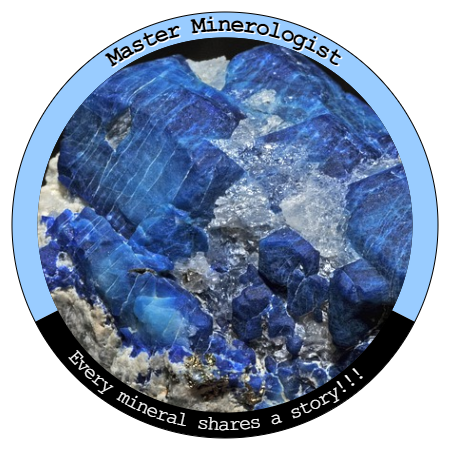
In Module 4, I had the pleasure of creating three progressive science assignments and designing my own badges. I enjoyed learning more about badges and the incentive they seem to have when students earn them. Many things are tied to badges these days--when you reach a certain exercise level you earn a badge; when you reach a new level on a mindfulness app you earn a badge, etc. Badges have a lot of power to engage learners and keep them coming back for more.
You can find the assignment specifics here. In discussing with several of my colleagues, we struggle with the administration and maintenance of a badge program. How can we virtually share the badges with students? How can students proudly display their badges virtually? I feel a bigger discussion needs to occur with our building's technology specialist in order to see this project really take off. I'm excited about the possibilities and appreciated the opportunity to use my creativity to drive student learning through these badge assignments.
![]() |
| Created by B. Schwartz, image source |
I came across a badge maker website when scrolling through my Twitter PLN and used it to make my three badges. Pixaby is my go-to image site to grab “free” stock photos. I’ve also used Google Draw and Canva for other infographic and design projects in the past and both of these platforms could be used for creating badges too.
| Assignment #1 Goal & Badge Earned: Identify & convert standard units commonly used in science. |
| Assignment #2 Goal & Badge Earned: Use evidence to support & explain different sphere interactions that exist on Earth. |
| Assignment #3 Goal & Badge Earned: Classify minerals based on their physical & chemical properties. |
You can find the assignment specifics here. In discussing with several of my colleagues, we struggle with the administration and maintenance of a badge program. How can we virtually share the badges with students? How can students proudly display their badges virtually? I feel a bigger discussion needs to occur with our building's technology specialist in order to see this project really take off. I'm excited about the possibilities and appreciated the opportunity to use my creativity to drive student learning through these badge assignments.
Labels:
#edtechusf679,
assessment,
badges,
Canva,
Google Draw,
ISTE,
Pixaby
679 Artifact Reflection #1
In Module 3, I compared two digital tools and designed two formative assessments for my high school Earth Science course. My first formative assessment (link) was made with Google Forms about stars. My second formative assessment (link) was made with Formative about groundwater resources.
I use Google Classroom in my classes, so for most formative assessments I push out the links through Classroom then collect and review responses once students are completed. Most of us know that formative assessments are meant are meant as a check-in for students to demonstrate their learning at a certain point in a unit and helps a teacher to ascertain their current understanding of skills and concepts. Teachers need to plan each assessment so that it provides direct evidence of student proficiency on learning standards.
![]() |
| image source |
I use Google Classroom in my classes, so for most formative assessments I push out the links through Classroom then collect and review responses once students are completed. Most of us know that formative assessments are meant are meant as a check-in for students to demonstrate their learning at a certain point in a unit and helps a teacher to ascertain their current understanding of skills and concepts. Teachers need to plan each assessment so that it provides direct evidence of student proficiency on learning standards.
![]() |
| image source |
Any of my science lessons could be 1-3 days. Through daily questioning and discussion, I’m constantly assessing my students. I give entrance or exit slips every few days and formative (practice) assessments (or quizzes) once a week. Sometimes I release the answers as soon as they complete the formative assessment, other times I show the responses from the whole class as a discussion, and still other times I assess on an individual level to look closely at each student’s progressive mastery on a learning goal or standard.
I like using Google Forms because it’s easy, quick, and intuitive. Google Forms works well with Google Classroom and I like that the assessment results go straight to a Google Sheets page. It allows me to analyze data and give students quick feedback on their performance. With certain add-ons, grading is a cinch. I used Formative for the first time in completing the module 3 assignment. I liked Formative because it was also easy, quick, and intuitive. The biggest positive difference was the ability to link NGSS standards to each question. Because this was my first time using it, I don’t know how the student’s results will look, but I’m convinced I’ll be using Formative as another tool in my assessment toolbox.
679 Course Reflection
That’s a wrap for EEND 679! There were many takeaways from this course and several great discussions that helped me get better at using and implementing technology. I’d like to thank the instructor and my classmates for an informative and beneficial course on assessment and improving student learning.
At the midpoint of the course, module 5, I had the chance to dabble with Genius Hour/Passion Project. It’s definitely a concept I’ve heard and read about, but haven’t found a way or a reason to “fit it in” with my science courses. After being given time in class to learn something new and to learn new things from others, I’m thoughtfully reflecting on how I might start to incorporate this project with my students. I enjoyed being given the freedom to choose a topic to research more about, but I struggled to settle on a topic. Based on other classmate’s experiences and feedback, I feel more confident attempting to start a Genius Hour/Passion Project with my students and plan to do some more research to prepare for next school year. I like the idea of passion projects and hope to find success with it in the near future.
In my artifact blog post, I made reference to the digital badge assignment and the formative assessment design assignment. I also found the infographic assignment and the student portfolio/self-assessment assignment to be useful for my students. After reviewing infographics of others in our class, I was blown away by how professional, clean, and informative they were. I had never used Piktochart or Canva before, and I certainly didn’t need much convincing to use it for myself and my students during the school year. It takes classes like these to introduce me to some really great ideas and I’m thankful to my colleagues for their infographic examples. Module 6’s student portfolio discussion and self-assessment assignment were also great learning experiences for me as I related to other’s background with student portfolios. I also found value in organizing several different student self-assessment forms. The practice of student self-assessment is an important piece in their education, no matter if they are a kindergartener or a 12th grader. I’ve been pushing my students to perform more self-assessments and reflections of their work. By the end of the school year, they really start to appreciate their achievement, progress, and growth. It’s easy for me to plot their progress over time, but there is more value when they can appreciate their journey over the course of a school year.
EEND 679 is my third course in the sequence of courses for the Teaching with Technology Endorsement. I've gotten a lot out of this course and intend to incorporate some of the new things I’ve learned from the instructor and my classmates/colleagues next school year.
![]() |
| image source |
![]() |
| image source |
EEND 679 is my third course in the sequence of courses for the Teaching with Technology Endorsement. I've gotten a lot out of this course and intend to incorporate some of the new things I’ve learned from the instructor and my classmates/colleagues next school year.
Subscribe to:
Posts (Atom)